Connect with us

Featured

How To Triple Portable Monitor With Laptop?

Published

on

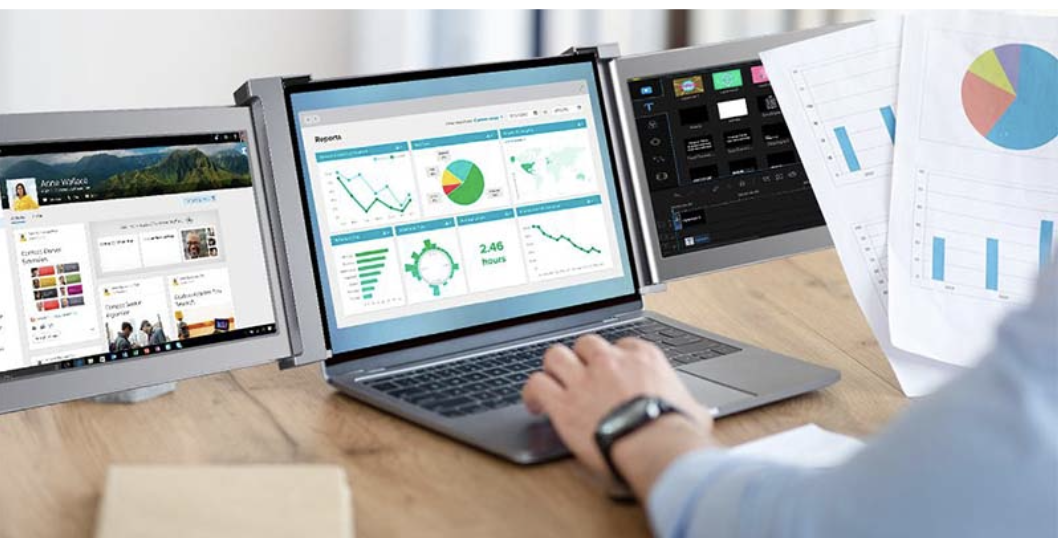
Purchasing triple portable monitors can happen at any stage, but it has become more prominent in the current generation. This is because more people have embraced working remotely. Many buyers of such products do so primarily for display increment when using a laptop. 

Unfortunately, only some people know how to use triple portable monitors with their laptops. If you fall under this category, you’re in the right place. This article will educate you on how to use triple portable screen extenders with your laptop, including the setup process and the additional devices. 

The Set-Up Procedure

Installing triple portable monitors and connecting them with a laptop or desktop isn’t as complex as many users assume. However, when you look for the information in this section, it is because you either lack the essential skills for such an undertaking or simply want to handle it as a DIY. These are the steps to follow to install these screen extenders and enjoy their benefits properly;

Confirm all the Items are in the Box

One of the most common mistakes among many screen extenders is not confirming whether everything necessary for a complete installation is included in the package. This consists of trio monitors and all the essential accessories. You can click here to get all the information about the items in the box when you unpack it. 

Connect the Cables

Connecting the cables can be tricky if you don’t understand which one goes where and what purposes they serve. Some cables you should link to extend your laptop’s screen are HDMI, DVI, VGA, and DisplayPort. I will explain what these acronyms in full and what they do to make it easy for you during the connection stage;

  • HDMI – You can use High Definition Multimedia Interface (HDMI) to transmit compressed and uncompressed audio data and uncompressed video data. However, you must ensure your laptop has the correct configuration, making it compatible with such a cable.
  • DVI – Digital Video Interface (DVI) is a color-coded cable you use to transmit video data, whose performance you can compare with HDMI.
  • VGA – Video Graphics Array (VGA) refers to analog visual connection cables and ports. Unfortunately, you can expect fuzzy and unclear images and videos with this option, considering it’s analog. 
  • DisplayPort – unlike VGA, DisplayPort is the most recent digital option for connecting your laptop with triple portable monitors. The cables look like USBs but have an angle on one end. 

HDMI is the most common of the four and is also what most people know about. Most new laptops and computers in the contemporary world have a USB-C port. This port can support a hub connecting several displays to just that one little port. You can shop around for the best hub that makes connecting several displays, including triple portable monitors, effortless.

Additional Devices

Chromecast

You can never ignore the benefit of a Chromecast, especially if you own a small laptop with only one USB and HDMI port. Chromecast allows you to transform any other monitor in your home into a screen extender, but you must ensure the device’s adapter is connected to your local network.

HDMI Splitter

As the name suggests, this gadget allows you to ‘split’ one HDMI port into two. The best thing is that you don’t require any power outlet to use this device. You should only plug the USB side into your computer and connect the external monitors to the HDMI ports on the other end. 

USB Adapter

How would you feel gaining the power to transform your USB port into an HDMI outlet? This Is precisely the freedom that a USB adapter gives you.

Possible Combinations

Now that you know all about the tools of the trade, it’s essential to know the best combinations, as stated below;

  • Combine an HDMI Splitter with a USB adapter
  • Blend the regular HDMI port with two 4k monitors and a USB-C to dual HDMI adapter
  • Use Chromecast, a USB-C-to-HDMI adapter, and an HDMI port

Extending your laptop’s screen isn’t as complicated as many think if you have accurate information. The details above may feel overwhelming, especially if you’re a first-timer handling such connections. Nonetheless, you can always switch to the best option, working with professionals in case you get stuck anywhere in the installation process.    

Editor-in-Chief at DroidJournal. A tech-enthusiast, guitarist, and an anime fanboy!

Click to comment

Leave a Reply

Your email address will not be published. Required fields are marked *

Latest

Celebrity3 months ago

Anna Faris Charms Seth Meyers With an Anonymous YouTube Confession and a One-of-a-Kind Award

Anna Faris brought the chaos — the good kind — to Late Night with Seth Meyers this week, and it...

Celebrity3 months ago

’90 Day Fiancé’ Star Jenny Slatten’s Slowed Speech Explained: Her ALS Diagnosis

90 Day Fiancé fans have spent months worrying about Jenny Slatten. Viewers who watched her speak slowly and haltingly in...

News3 months ago

‘Golden Bachelorette’ Joan Vassos Shuts Down Split Rumors: ‘I’m Still With Chock’

Joan Vassos wants Bachelor Nation to relax. After fans noticed she and fiancé Charles “Chock” Chapple hadn’t been posting together...

Celebrity3 months ago

Eric Braeden Brings Victor Newman to ‘Beyond the Gates’ in Landmark Soap Crossover June 9

Victor Newman is leaving Genoa City behind — at least for a few episodes. Eric Braeden, who has anchored The...

Celebrity3 months ago

Selena Gomez Goes Red: Star Debuts Curly Crimson Hair and Fans Are Obsessed

Selena Gomez just hit “refresh” on her signature look, and the internet hasn’t stopped talking about it since. The singer,...

News3 months ago

‘Wheel of Fortune’ Player Was One Word Away From $75K — Then This Happened

It was right there. The letters were on the board, the answer practically spelling itself out — and Wheel of...

Featured2 years ago

GEMINI NEAR ME: A New App Revolutionizing Self-Love and Relationship Coaching

In today’s fast-paced, tech-driven world, finding meaningful connections—both with others and within ourselves—can certainly be challenging! Droid Journal has tried...

Celebrity2 years ago

In Her Own Words: Shannon Uskin on Modeling, Travel, and Staying Grounded

Shannon Uskin is a Canadian fashion model known for her striking presence on the runway and in editorial campaigns. With...

News2 years ago

My Life with the Walter Boys Season 2: Release Date, Trailer, and more!

Developed by Melanie Halsall, My Life with the Walter Boys is an American coming-of-age teen drama television series. It is...

News2 years ago

The Diplomat Season 2: Release Date, Cast, and more!

Created by Debora Cahn, The Diplomat is an American political thriller television series. Cahn is also the executive producer of...

Advertisement